 Doorbook
How the bill is worked out
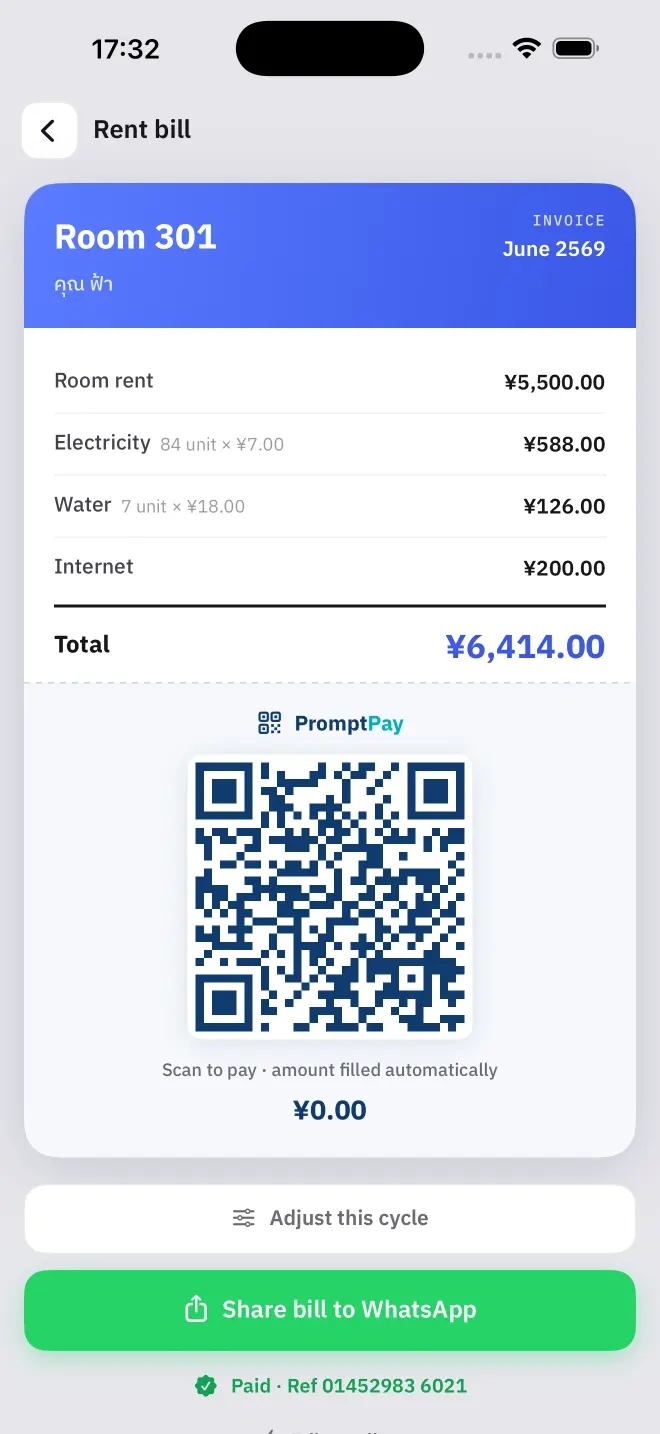
A bill is six lines, and Doorbook fills in all of them. Nothing is estimated and nothing is rounded away — every figure on it can be traced back to a rate you set or a reading you took.
When a bill appears
A room's total exists only once both meters have been read for the cycle. Until then the room shows as unread rather than showing a partial figure, because a rent-only total handed to a tenant is a bill you will have to correct.
A one-off discount or extra charge
Any room can carry a single signed adjustment for the current cycle: negative for a discount, positive for an extra charge. A short note travels with it and is visible to the tenant on the bill, so the reason is on the document rather than in your memory.
- Use it for a repair you are charging back, a rubbish or parking fee, a month's goodwill discount, or a replaced light fitting.
- The note is capped at 60 characters. It rides on every sync, so it is a line, not an essay.
- It applies to this cycle only. Closing the month clears it, which is what makes it one-off rather than something you have to remember to remove.
- A discount larger than the bill brings the total to zero, not below it — and the payment QR is generated for zero, not for a negative amount.
Unpaid balance from last month
If a room did not pay in full before you closed the cycle, whatever was outstanding is carried onto the next bill as its own line. You do not have to track it, and the tenant sees where it came from.
Recording what came in
- Mark a room paid when the money arrives, whether that was a bank transfer or cash.
- A partial payment can be recorded as an amount rather than as a yes or no, and the remainder stays outstanding.
- The home screen totals what you have billed against what you have collected, so you can see the month's position without adding anything up.
Read next
Getting paid
Doorbook puts a payment QR on every bill: PromptPay in Thailand, VietQR in Vietnam, KHQR in Cambodia, or a photograph of your own bank QR anywhere else.
NextClosing the month
Closing a cycle in Doorbook files the month into history, turns this month's meter readings into next month's baseline and carries any unpaid balance forward.